

Release Notes
v2.0.0
Release Date: October, 2026
Multi-structure support
- A single Hover job can now hold several structures (models), such as a house plus a detached garage. Each structure gets its own deliverable, reconstruction state, measurements, and estimates in Salesforce.
- New custom object: Hover Models (
Hover_Model__c), related to the parent Hover Job. Each record stores the structure's name, Hover Model ID (Hover_Model_ID__c), reconstruction state (State__c), deliverable (Deliverable__c), and failure reason (Failure_Reason__c). - Hover Model records are created and updated automatically from the
model-createdandmodel-state-changedwebhook events. Each structure's name, state, and deliverable are synced from Hover. - Added a dynamic related list of Hover Models to the Hover Job record page.
- Added a new Hover Model record page and tab. The record page is the default for Hover Model.
Measurements per structure
- When a structure finishes reconstructing, its roof and siding measurements are written to that structure's Hover Model record. Each structure's measurements are kept separate, so a garage's measurements never overwrite the house's.
- New
hoverModelMeasurementsLWC shows roof and siding measurements for a single structure on the Hover Model record page. - The
hoverPDFLinkLWC now works on Hover Model records and opens that structure's measurements PDF. The button turns on once the structure has finished reconstructing and shows a tooltip explaining why while it's disabled. - The legacy roof and siding measurement fields on the Hover Job object are still present but are no longer updated. Point any reports, flows, or page layouts that use them at Hover Model instead.
Estimates linked to structures
- Hover Estimates (
Hover_Material_List__c), Hover Estimate Line Items (Hover_Estimate_Line_Item__c), and Adjustments (Hover_Adjustment__c) now include a Hover Model lookup (Hover_Model__c) alongside the Hover Job lookup, so you can report on estimates by structure.
Project schedule, deposits, and installments
New fields on the Hover Estimate object:
- Project schedule: Estimated Start Date (
Estimated_Start_Date__c), Estimated End Date (Estimated_End_Date__c), Actual Start Date (Actual_Start_Date__c), and Actual End Date (Actual_End_Date__c). - Deposit: Deposit Amount (
Deposit_Amount__c), Deposit Due Date (Deposit_Due_Date__c), and Deposit Received Date (Deposit_Received_Date__c). - Installments: Installment Count (
Installment_Count__c) and the full installment schedule in Payment Installments JSON (Payment_Installments_JSON__c). - New
hoverPaymentInstallmentsLWC shows the installment schedule on the Hover Estimate record page.
Prorate deposit by trade
- The deposit can now be split across each trade estimate. This is gated behind the new Prorate Deposit By Trade custom setting (
Hover_Config__c.Prorate_Deposit_By_Trade__c), off by default.
Line item notes
- New field: Notes (
Notes__c) on the Hover Estimate Line Item object, populated from notes entered in Hover. - The
materialListLWC now shows line item notes.
Multi-structure test jobs
- New Create Test Job list view button on the Hover Jobs tab creates a Hover test job with three structures and links it to a new Hover Job record in Salesforce. This process takes approximately 1-2 minutes for data to flow back to Salesforce.
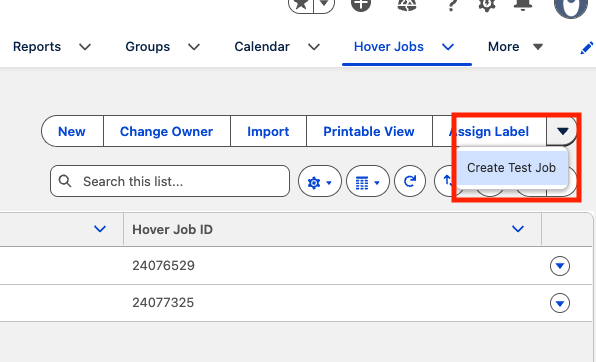
- Test jobs can only be created from the parent (authenticated) Hover org, not from a suborg.
- The
updateJobStatusButtonLWC now carries a warning that it's for integration testing only. It sets the test state on the whole job, so it doesn't support multi-structure jobs. - The
updateJobStatusButtonLWC is now hidden on the Hover Job record page once the job's reconstruction state iscompleted.
Jobs created in Hover link back to Salesforce
- When a job created in Hover is linked to a Salesforce record, the Salesforce record Id is written back to the Hover job's external identifier. Later webhooks for that job then match the right Hover Job record.
Other changes
- Inspection data is now pulled in when an inspection reaches
complete. Previously it was pulled atsubmitted. - Added Interior Floor Plan to the Hover Job deliverable picklist (
deliverable_id__c). - Job and model data now come from Hover's v3 API.
- Renamed labels on the Hover Job object: State is now Reconstruction State (
State__c), and HOVER Job ID is now Hover Job ID (HOVER_Job_ID__c). No API name changes; only the user-visible labels have changed.
Removed
- The
HOVER_Job_Complete__eplatform event and theProcessJobCompletetrigger have been removed. Any flow, trigger, or external subscriber listening for this event will stop receiving it. Use Hover Model state changes instead. - A job-level "complete" status no longer triggers a measurements fetch. Measurements are now fetched per structure, once that structure is complete.
v1.7.16
Release Date: August 4th, 2026
Backup User fallback for job creation
- Jobs that fail to send to Hover with a 422 because the assigned Salesforce user has no Hover account are now automatically retried using a configured backup user, so the job still gets created (under the parent org).
- Set the fallback via the new Backup User Email (Backup_User_Email__c) field on the Hover Config custom setting; leave it blank to disable the retry.
- The assignee on the Salesforce Hover Job is left unchanged — existing assignment automations continue to drive reassignment to the intended rep.
Sync visibility on the Hover Job
- Two new fields report the outcome of each push to Hover:
Sync StatusSync_Status__c) — Synced, Push Failed, Assignment Failed, or Backfilled.
Last Sync ErrorLast_Sync_Error__c) — the status code and response body from Hover when a push fails.
Safer job reassignment
- Changing a Hover Job's assignee to a user without a Hover account no longer sends an invalid request.
The integration skips the reassignment call and records the miss on the recordSync_Status__c=Assignment Failed, with detail inLast_Sync_Error__c). - Reassignment failures returned by Hover are likewise stamped on the Hover Job instead of being logged out of view.
v1.7.14
Release Date: July 27th, 2026
Markup % and Profit Margin on split-by-trade estimates
- Markup Percent
Markup_Percent__c) and Profit MarginProfit_Margin__c) now populate on each split-by-trade estimate (a custom setting). Previously they appeared only on the combined estimate and were blank on the individual trade estimates. - Each trade estimate calculates these from its own line items, so every trade shows values specific to that trade.
- Markup Percent = the trade's total markup ÷ the trade's cost.
- Profit Margin = (the trade's price after adjustments − the trade's cost) ÷ the trade's price after adjustments.
Template-level adjustments on split-by-trade estimates
- Adjustments applied to a single template now carry through to that template's trade estimate, instead of appearing only on the combined estimate.
- A template-level adjustment now creates a matching record on the Adjustments object
Hover_Adjustment__c) for that template's trade estimate, in addition to the record on the combined estimate. - Whole-job adjustments continue to divide evenly across the trades, and each trade's total still reconciles to the combined estimate.
- A template-level adjustment now creates a matching record on the Adjustments object
v1.7.13
Release Date: July 23rd, 2026
Sales tax on split-by-trade estimates
- Sales tax on split-by-trade estimates (a custom setting) came out too low. It now matches the sales tax in Hover.
- Each trade estimate shows its own share of the sales tax, and the trades add up to the estimate total.
- Trade estimates now show the correct Markup Total, which previously displayed as zero.
Discounts and surcharges on split-by-trade estimates
- Discounts and surcharges now carry through to split-by-trade estimates, so each trade reflects its share.
- The total adjustment is divided evenly across the trades on the estimate.
- Each trade's total price now reflects its share of any discount or surcharge.
- The Promotions field is now labeled Adjustments (
Promotions__c). It shows the combined net of every discount and surcharge on an estimate—when a surcharge is larger than the discounts, the value is negative.
Tax Rate and Waste Factor on estimate line items
- Tax Rate (
Line_Item_Tax_Rate__c) and Waste Factor (Line_Item_Waste_Factor__c) now display as decimal numbers instead of percentages, so you can use them directly in reports and formulas.
v1.7.12
Release Date: July 14th, 2026
Mobile Capture Link support
- The "Open Photo Capture" deep link now uses an HTTPS smart link (
https://hover.app.link?action=capture&identifier=…) instead of thehihover://custom URL scheme.- This resolves cases where the link failed to launch the Hover app from within the Salesforce mobile app. On mobile it opens the Hover app directly to the job's Photo Capture flow; on desktop it falls back to the Hover homepage.
- New field Mobile Capture Link (
Mobile_Capture_Link__c) on the Hover Job record provides this link as clickable text, derived automatically from the Hover Job ID. - The hoverDeepLink Lightning Web Component now generates the same HTTPS link, so the on-record button works in the Salesforce mobile app.
Link to Estimate fixed on Hover Job Object
- The dynamic Estimates related list on the Hover Job record now includes the estimate Name and Hover Material List ID columns, making it easier to open the associated estimate directly from the job.
v1.7.10
Release date: July 9th, 2026
Sub-org webhook support
- Jobs created in a Hover sub-org can now be shared to the parent org on creation, so the parent org's webhook subscription receives their completion and measurement events — fixing cases where sub-org jobs never completed or pulled measurements in Salesforce.
- Controlled by the
Enable Suborg Access on Job CreatesettingHover_Config__c.Enable_Suborg_Access__c) - New field:
Parent_Org_ID__con theHover Jobrecord, stamped automatically at creation.
v1.7.9
Release date: June 26th, 2026
Deep link to the Hover mobile app
- New
hoverDeepLinkLWC launches the Photo Capture flow from a record. Placeable on any object via App Builder using the configurable Job ID Field property (defaultHOVER_Job_ID__c, supports lookup paths likeHover_Job__r.HOVER_Job_ID__c). - Companion
Hover_Deep_Link__cformula field gives the same link as clickable text. Mobile only.
Auto-create estimates
Auto-create estimates
- Estimates are now created in Salesforce upon their creation in Salesforce. This functionality is gated behind the the
Auto Create Estimatecustom settingHover_Config__c.Auto_Create_Estimate__c), off by default. - Upgrade note: grant the guest site user and the Hover permission set access to the new
HoverSyncMaterialListOnCreateApex class, or the flow fails silently.
Create Estimates by Trade/Template
- Estimates split by trade/template via
Split_Estimates_By_Trade__cCustom Setting. This is off by default.
New Fields Added
Financing_Provider__c,Financing_Name__c,Financing_APR__c,Financing_Length__c,Financing_Down_Payment__c,Is_Financed__c.all added as new fields to the Hover Estimate object.- Adjustments: promotions now modeled as
Adjustment_Value__c. - New measurement fields:
Hips_Length__candRidges_Length__c
v1.7.1
Release date: March 4th, 2026
Job Notes
- Added
Hover_Note__candHover_Note_ID__cfields to the Hover Job object to
support creating and updating notes directly from Salesforce. - Notes are automatically posted to Hover when a job is created with a note
pre-filled, and patched when the field is updated on an existing job.
Deliverable Change Request
- Added support for the
deliverable-change-request-state-changedwebhook
event, enabling the integration to process upgrades from Capture Only jobs to
Roof Only or Complete. - On completion, the job's deliverable type is updated in Salesforce and
measurements are automatically retrieved.
Capture Only, Photos Only
-
Added support for Deliverable ID 7 (Capture Only, Photos Only) when creating
HOVER jobs from Salesforce.Deliverable Sync on Job Completion
-
When a Hover job reaches the complete state, the
Deliverable_ID__cfield on
the Salesforce record is now automatically updated to reflect the deliverable
type in Hover (Roof Only or Complete).Hover Estimate Line Items
-
Introduced a new
Hover_Estimate_Line_Item__ccustom object to store
individual line items from Hover estimates, with fields for name, product ID,
quantity, unit cost, total price, markup, tax rate, waste factor, trade type,
activity code, measurement unit, and variation. -
Added full CRUD support (create, update, delete, upsert) for Estimate Line
Items, synced from the Hover Estimate API response.
Estimate Locking
- Added a new estimate_is_locked__c field to the Hover Estimate custom object
to track lock status. Implemented HoverLockEstimateandHoverQueueableLockEstimateApex classes to
call the HOVER API and lock an estimate.- Added a new Lock Hover Estimate Flow to trigger the locking process from the
UI. - Updated the Update Hover Job Flow to incorporate the new estimate lock
process flow.
v1.6.3
Release date: January 26, 2026
-
Estimation integration (Hover → Salesforce)
- Added a new custom object:
Hover Estimates - Supports a one-way sync of estimation data from Hover into Salesforce
- Users can initiate the Estimation workflow from Salesforce via an LWC on the Hover Job object
- Added a new custom object:
-
Inspection integration (Hover → Salesforce)
- Added a new custom object:
Hover Inspections - Supports a one-way sync of inspection data from Hover into Salesforce
- Added a new custom object:
-
Related lists
- Added dynamic related lists for Inspections and Estimates on the parent Hover Job object
-
Renaming
- Renamed Hover Material Lists to Hover Estimates
- No API name changes: underlying API names remain the same; only the user-visible labels have changed
Updated 17 days ago